Why you can trust TechRadar
We spend hours testing every product or service we review, so you can be sure you’re buying the best. Find out more about how we test.
MechLands Vibe99: One-minute review
The MechLands Vibe99 is a mechanical keyboard that takes aim at the budget-end of the market, but does so without any apparent sacrifices to features or performance.
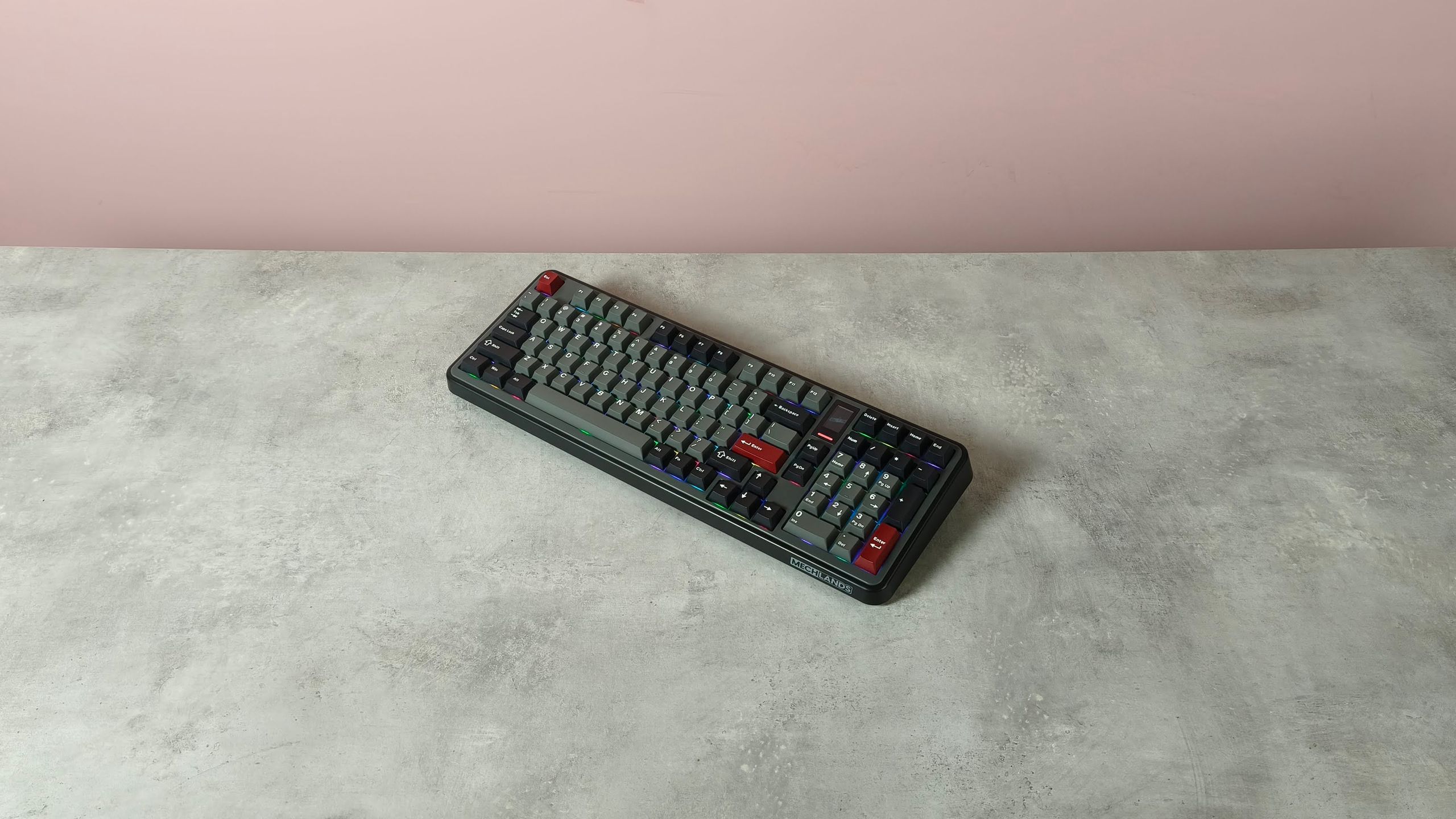
It doesn’t make a great first impression, however. The retro aesthetic fails to charm, with its chunky design and the copious amounts of grey in my review unit merely looking downmarket. Fortunately, the bright and customizable RGB backlighting does help to liven it up a little.
The build quality isn’t terribly impressive, either. The plastic chassis is solid but doesn’t feel premium. Fortunately, the Double-shot PBT keycaps are much better, although their opaque legends don’t allow that aforementioned backlighting to shine through. Their Fn shortcuts aren’t labelled, either, unlike those installed in the best gaming keyboards.
Latest Videos FromTechRadar
However, the compact width of the Vibe99 is impressive, and thanks to the smart 1800 layout, you still get plenty of keys. What’s more, it also features an integrated screen. It may be a basic TFT affair with limited information displayed, but what it does show is useful, such as the time, date, and battery level. You can also upload GIFs to it if you so wish, but I wouldn’t advise that you do, given the screen’s small size and low fidelity.
You’ll need to use MechLand’s peripheral software to upload them, but it takes an incredibly long time to do so, and you can’t do much else while it’s in progress. What’s more, the whole app has a poor UI, lacking sharpness and clarity. The remapping suite is also disappointing, with only a basic selection of assignments and no direct visual indication of your rebindings.
The performance of the Vibe99 itself fares better. The keys are generously lubed yet quite clicky, lacking the dampening of the very best in the space. However, they’re satisfying to use and have plenty of snap, actuating and rebounding quickly while forgiving accidental hits. The natural tilt of the layout and the folding feet help to make the board more comfortable to use as well, although I still wish it came with a wrist rest.
It’s impressive that the Vibe99 offers all that it does at such a low price point. It’s far cheaper than many of the mechanical models offered by the big brands, and it’s even cheaper than some other great budget options. It’s not perfect, and the software isn’t as good as it should be, but the Vibe99 is still worth shortlisting if you’re looking to save.

MechLands Vibe99 review: Price & availability
- $82.99 / £63.99 / AU$120
- Available now
- One of the cheapest mechanical keyboards around
The Vibe99 costs $82.99 / £63.99 / AU$120 and is available now in various colorways but with one switch type, which is MechLand’s Linear Mint model. It comes with a keycap puller and a braided USB cable.
This is a very competitive price for a 1800 wireless mechanical keyboard with hot-swappable switches. It’s even cheaper than the aluminum variant of the MonsGeek FUN60 Ultra, which has fewer keys. However, the build quality of that board is superior, and thanks to its analog switches, it has far more performance-related tweaks.
The Vibe99 is also considerably cheaper than big-name mechanical models, such as the Razer BlackWidow V4 Pro 75%. But the BlackWidow has a far superior build and unrivaled performance, thanks to the glorious response of its switches. Its software is much better, too.
MechLands Vibe99 review: Specs
|
Layout |
1800 |
|
Switch |
Mechanical (MechLands Cream Mint Linear) |
|
Programmable keys |
Yes |
|
Dimensions |
16.5 x 5.9 x 1.7 inch (418 x 150 x 42mm) |
|
RGB or backlighting |
Yes (customizable) |

MechLands Vibe99 review: Design & features
- Tired looks
- Cheap-feeling plastics
- Poor software
The Vibe99 aims for that faux-retro appeal, but I don’t think it succeeds. Not only does the thick base look dated, but the grey and black finish of my review unit looked quite dour. The bright RGB backlighting did at least add some vividness though.
Unfortunately, the build quality isn’t anything to write home about either. Although it feels solid enough, the plastics used throughout feel cut-price, especially when compared to the aluminum frames of more upmarket gaming keyboards. Its saving grace is its keycaps, which have a Cherry profile and are made from Double-shot PBT. They’re also solidly installed with next to no play. However, it’s a shame their legends aren’t transparent to allow the backlighting to shine through. Also, the default Fn shortcuts across the Function row and dotted around elsewhere aren’t labelled, so you’ll have to commit them to memory.
To speak in favor of the Vibe99’s design, it’s an impressively compact board, and its 1800 layout means it still manages to feature plenty of keys, including a number pad. It’s also quite light, which makes it easy to maneuver when required.

What’s more, a TFT display is nestled in the top corner, and while it’s small with a low resolution, it still provides some useful readouts, such as those for the time, date, and the battery life. You can also upload custom GIFs to it via the MechLands’ software for Windows, although I’m not sure it’s worth the effort given the screen’s quality.
This software also lets you record macros and customize the Vibe99’s backlighting. You can remap keys here as well, although the selection on offer is quite lackluster, with only a handful of system and media shortcuts available. What’s more, your selected bindings aren’t shown on the layout map directly; you have to hover over each individual key to see your remapped function, which is highly impractical.
The rest of the app’s UI has issues, too. Text and various other elements are fuzzy and sometimes oddly proportioned. Worse still is the aforementioned GIF uploader: during my testing it took an achingly long time for one to upload, and most of the app was inaccessible during the process. To add insult to injury, the dialog box for its progress remained on top of all my other windows, not just the app’s. If you’re hoping such issues will be patched, I wouldn’t get your hopes up; according to MechLand’s website, the last update for the software was in 2025.

MechLands Vibe99 review: Performance
- Pre-lubed keys
- Snappy response
- Needs wrist support
In contrast to its somewhat incompetent software, the Vibe99 is a solid and impressive performer. The keys are well lubed, which makes them feel less harsh when pressed, yet they still retain a gratifying clickiness. They’re relatively loud, but thankfully the noise isn’t grating.
They’re also quite snappy, thanks to their reasonably shallow actuation point and fast rebound. However, they’re not so reactive that mere grazes will trigger them, which means you won’t be making many typos.

What also helps with typing are the keycaps, with their low Cherry profile making them easy to glide over. Additionally, they’re spaced far enough apart to prevent mis-hits, yet close enough to make gaming comfortable, with various common keys remaining easy to reach from the WASD position. The space bar is a triumph as well — the combination of its low profile and sloping shape makes it conducive to direct hits on its top surface, rather than on its back edge.
However, the Vibe99 really needs to be paired with a wrist rest to make it comfortable for long sessions. That aforementioned thick chassis strained my wrists as I reached for the keys. The natural tilt of the layout and the unit’s fold-out feet improve ergonomics to an extent, but neither can compensate entirely for the lack of additional support.
The Vibe99 connected to my Windows PCs via the 2.4GHz dongle and Bluetooth just fine, and hot-switching between them was quick thanks to the toggle switch on the back of the unit.
Should I buy the MechLands Vibe99?
Scorecard
|
Attributes |
Notes |
Rating |
|
Value |
This keyboard has one of the best price-to-spec ratios I’ve ever seen. |
4.5 / 5 |
|
Design and features |
Solid enough, but it doesn’t look or feel premium. The software is functional but barebones and features a poor UI. |
3 / 5 |
|
Performance |
The switches are well lubed and have a snappy response. However, you’ll need some additional wrist support to get comfortable. |
4 / 5 |
|
Overall |
The Vibe99 is a veritable bargain at this price, considering all that it offers. You’ll need to bring your own wrist support, though, and I hope you’re not after incredible accompanying software. |
3.5 / 5 |
Buy it if…
Don’t buy it if…
MechLands Vibe99 review: Also consider

How I tested the MechLands Vibe99
- Tested for several weeks
- Used for a variety of tasks
- Plentiful gaming keyboard experience
I tested the Vibe99 for several weeks, during which time I used it for gaming, working, and general productivity. I used it with two Windows 11 PCs, one connected via the 2.4GHz dongle and the other via Bluetooth, and regularly hot-switched between them.

One of the games I played with the keyboard was Counter-Strike 2, which is a great test for peripherals since it requires quick and accurate movements.
I’ve been PC gaming for over a decade, and have used a large number of keyboards in that time. I’ve also reviewed plenty of them, from budget offerings to premium models from the likes of Razer, Corsair, and SteelSeries.
- First reviewed: August 2026
- Read more about how we test