
• About
  • Advertise
  • Privacy & Policy
  • Contact
All Access London
Advertisement
  • Home
  • General
  • Celebrity
  • News
    • London
    • UK
    • Business
    • Politics
    • Science
  • Tech
    • Apps
    • Gadgets
    • Mobile
    • Startup
  • Entertainment
    • London Ent.
    • Gaming
    • Movies
    • Music
    • Sports
    • TV
  • Lifestyle
    • Fashion
    • Food
    • Health
    • Travel
  • Reviews
No Result
View All Result
  • Home
  • General
  • Celebrity
  • News
    • London
    • UK
    • Business
    • Politics
    • Science
  • Tech
    • Apps
    • Gadgets
    • Mobile
    • Startup
  • Entertainment
    • London Ent.
    • Gaming
    • Movies
    • Music
    • Sports
    • TV
  • Lifestyle
    • Fashion
    • Food
    • Health
    • Travel
  • Reviews
No Result
View All Result
All Access London
No Result
View All Result
Home Tech Apps

Docker Manager finally gave me a container management UI I can use on smartphones

All Access London Team by All Access London Team
June 8, 2026
in Apps
0
Docker Manager finally gave me a container management UI I can use on smartphones
0
SHARES
6
VIEWS
Share on FacebookShare on Twitter


When it comes to control planes and management UIs for Docker containers, you’ve got plenty of options to choose from. Between its sheer number of container tools, built-in CI/CD pipelines, and support for everything from Docker and Podman to K8s, Portainer is the most common option out there. But if you prefer minimalist UIs, Dockhand and Dockge are just as reliable, with the former being my favorite ever since I ran into it a few months ago. But if you’re willing to install community plugins, you can even use Cockpit to control your Docker runtime.

That said, although every tool I’ve listed so far works well on laptops and desktops, smartphones are a different story altogether, especially if you stick to the default mobile layout on their web UIs. Fortunately, Docker Manager solves this problem by offering a solid mobile interface for controlling containers spread across multiple home lab nodes – and it’s the reason I’ve moved on from a Termux + SSH setup when troubleshooting my self-hosted apps from my smartphone.

Docker Manager provides a sleek mobile UI for container management tasks

And it includes all the tools I could ask for

My biggest issue with the mobile layouts on typical Docker management platforms is that they’re a bit of a pain to navigate. The default mobile UI is often too zoomed in, and I’d have to scroll past multiple settings to get to the logs or shell tabs when I need to troubleshoot things. But switching it to the desktop layout causes everything to get too zoomed out, and I’d have to constantly pinch my fingers when navigating through different tabs.

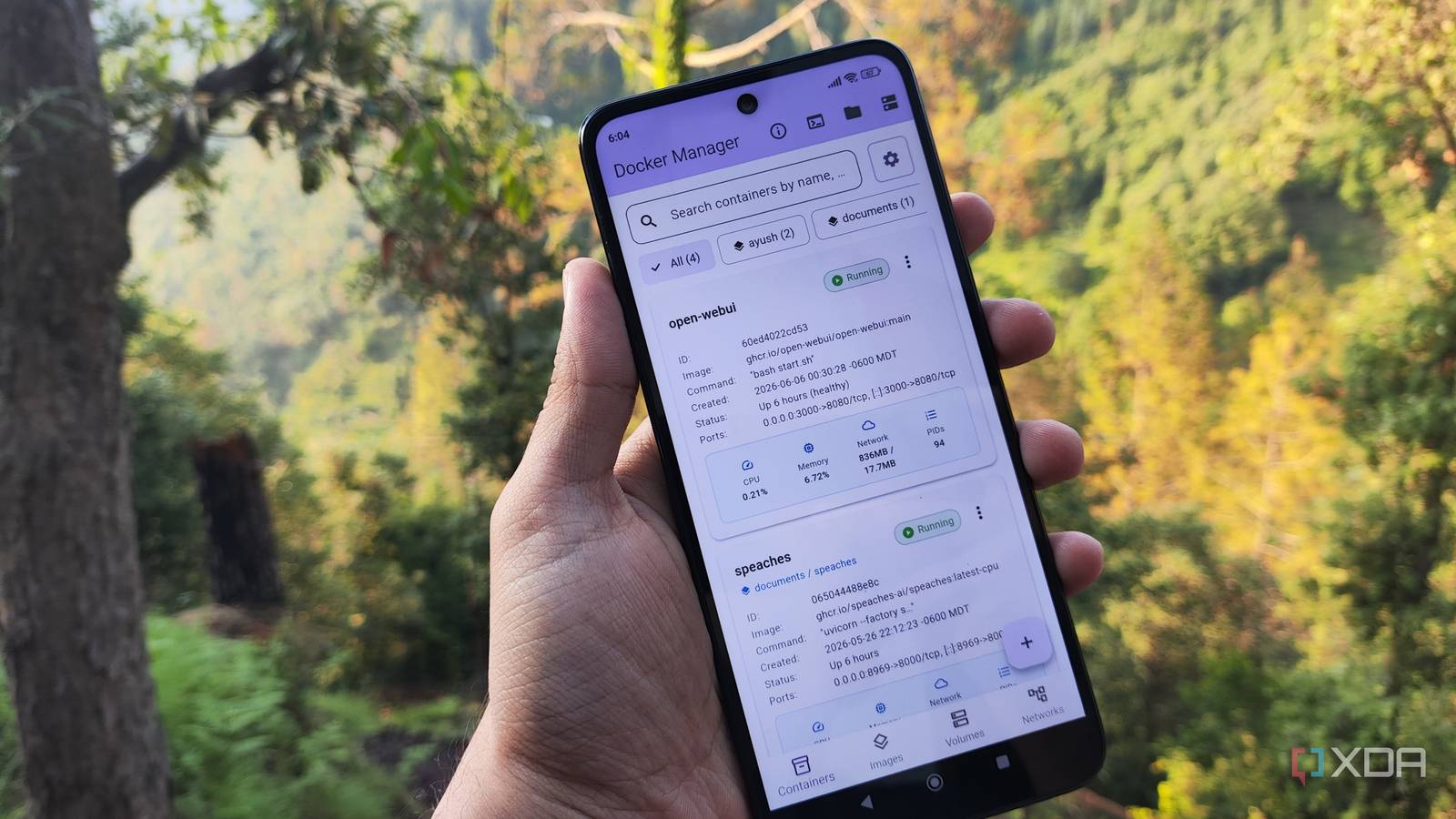
In contrast, Docker Manager is a dedicated application that fits the essential container management utilities into a neat UI that doesn’t look out of place on a smartphone screen. The Containers section includes the ID, image name, status, port mapping, resource consumption stats, and other details of my self-hosted stack, and I can use the menu button to check their logs, switch to a Shell UI, or stop/restart them.

Creating new containers is just as simple, as I can select the ports, environment variables, and bind mounts for my FOSS images. Likewise, I can pull OCI-compliant images directly from Docker Hub, or even build ones from scratch inside Docker Manager. The images, persistent volumes, and network devices have their own tabs at the bottom of the screen. My only complaint is that the last two should have a few more options besides Inspect and Delete for my storage volumes and network bridges. But seeing as how I probably won’t spin up complex containers from a smartphone anyway, I don’t want to go too hard on the app, especially since it lets me swap between different Docker servers with a single tap…

It can pair with multiple Docker instances

Including Docker servers running in rootless mode

As a hardcore home labber, I’ve got Docker servers configured on my MacBook, Raspberry Pi nodes, old laptops, virtual machines, and practically everything that can run containers. Luckily, Docker Manager can connect to every system in my arsenal, regardless of its underlying OS. Since the app uses an SSH connection to hook up to my Docker environments, I rely on passkey authentication to avoid the security loopholes of password logins. But if you’re a casual tinkerer, you can still use password authentication when adding a new environment to Docker Manager.

Speaking of security, I usually run Docker in rootless mode, and the mobile control panel has no issues connecting to these less privileged containerization environments. Heck, as long as I specify the Podman directory under the Docker CLI Path variable, I can even control, create, and configure Podman containers within Docker Manager, which is pretty useful as I’ve started to get accustomed to this FOSS runtime. In fact, I’ve added a couple of servers twice: once with the default settings for the Docker environment, and again with the Podman directory, just so I could manage both runtimes from the mobile app.

Running some containers using Apple Container


Apple Container turned my Mac into a self-hosting war machine

It’s hands-down the most resource-efficient method for running containers on macOS

Docker Manager can even control the host machine to some extent

It’s for quick troubleshooting when things go south

SSHing into a host via Docker Manager

Since we’re on the subject of host machines, Docker Manager can also help debug problems with the underlying system. Besides pulling the system specs and resource consumption metrics for the host, it can also SSH directly into the machine, so I don’t have to switch to Termux just to run terminal commands.

Heck, it can even browse the directories on the host, which is pretty useful when I need to modify files inside my container’s persistent volumes. Since the app doesn’t let me modify Docker Compose files manually, I use the file browser to tweak variables in compose.yml files directly before executing docker compose up -d via the terminal as a workaround. That said, I’d recommend creating a user with low privileges for Docker Manager just to avoid security issues if you’re as paranoid as I am.




Source link

Tags: containerDockerfinallygavemanagementmanagersmartphones
Previous Post

Europe to ramp up defence against Putin’s hypersonic missiles after Ukraine strike

Next Post

Primavera Sound Barcelona 2026 festival review

All Access London Team

All Access London Team

Next Post
Primavera Sound Barcelona 2026 festival review

Primavera Sound Barcelona 2026 festival review

Leave a Reply Cancel reply

Your email address will not be published. Required fields are marked *

  • Trending
  • Comments
  • Latest
Coronation Street cast 2026 | Joining, leaving, returning characters

Coronation Street cast 2026 | Joining, leaving, returning characters

May 9, 2026
Trade London for Brighton This Weekend

Trade London for Brighton This Weekend

May 7, 2026
Who are Andy Burnham’s key aides and allies? | Andy Burnham

Who are Andy Burnham’s key aides and allies? | Andy Burnham

May 23, 2026
Independence Day 2026 Events: Where To Celebrate 4 July In London

Independence Day 2026 Events: Where To Celebrate 4 July In London

May 8, 2026
Merton roads being resurfacing or repaired this year from Mitcham to Wimbledon – full list

Merton roads being resurfacing or repaired this year from Mitcham to Wimbledon – full list

1
The World Naked Bike Ride Returns To London This Summer

The World Naked Bike Ride Returns To London This Summer

0
London's Hidden Roman Bathhouse Reopens For Tours

London's Hidden Roman Bathhouse Reopens For Tours

0
Bring Out The Bunting: St George's Day Celebrations Are Coming To Trafalgar Square

Bring Out The Bunting: St George's Day Celebrations Are Coming To Trafalgar Square

0
Noah Woods missing: Watch as police issue update on hunt for missing 3-year-old Noah Woods

Noah Woods missing: Watch as police issue update on hunt for missing 3-year-old Noah Woods

September 16, 2026
Innovative London City 7s backed to become must-watch rugby event in the capital

Innovative London City 7s backed to become must-watch rugby event in the capital

September 16, 2026
Reform MS who defected to Plaid Cymru says Nigel Farage’s party is ‘falling apart’

Reform MS who defected to Plaid Cymru says Nigel Farage’s party is ‘falling apart’

September 16, 2026
Strictly 2026: Meet the new professional dancers ahead of glitzy season launch

Strictly 2026: Meet the new professional dancers ahead of glitzy season launch

September 16, 2026

Recent News

Noah Woods missing: Watch as police issue update on hunt for missing 3-year-old Noah Woods

Noah Woods missing: Watch as police issue update on hunt for missing 3-year-old Noah Woods

September 16, 2026
Innovative London City 7s backed to become must-watch rugby event in the capital

Innovative London City 7s backed to become must-watch rugby event in the capital

September 16, 2026
Reform MS who defected to Plaid Cymru says Nigel Farage’s party is ‘falling apart’

Reform MS who defected to Plaid Cymru says Nigel Farage’s party is ‘falling apart’

September 16, 2026
Strictly 2026: Meet the new professional dancers ahead of glitzy season launch

Strictly 2026: Meet the new professional dancers ahead of glitzy season launch

September 16, 2026
All Access London

We bring you the best Premium WordPress Themes that perfect for news, magazine, personal blog, etc. Check our landing page for details.

Follow Us

Browse by Category

  • Apps
  • Business
  • Celebrity
  • Entertainment
  • Fashion
  • Food
  • Gadgets
  • Gaming
  • General
  • Health
  • Lifestyle
  • London
  • London Ent.
  • Mobile
  • Movies
  • Music
  • Politics
  • Reviews
  • Science
  • Sports
  • Startup
  • Tech
  • Travel
  • TV
  • UK

Recent News

Noah Woods missing: Watch as police issue update on hunt for missing 3-year-old Noah Woods

Noah Woods missing: Watch as police issue update on hunt for missing 3-year-old Noah Woods

September 16, 2026
Innovative London City 7s backed to become must-watch rugby event in the capital

Innovative London City 7s backed to become must-watch rugby event in the capital

September 16, 2026
  • About
  • Advertise
  • Privacy & Policy
  • Contact

© 2026 All Access London

No Result
View All Result
  • General
  • Celebrity
  • News
    • London
    • UK
    • Business
    • Politics
    • Science
  • Tech
    • Apps
    • Gadgets
    • Mobile
    • Startup
  • Entertainment
    • London Ent.
    • Gaming
    • Movies
    • Music
    • Sports
    • TV
  • Lifestyle
    • Fashion
    • Food
    • Health
    • Travel
  • Reviews

© 2026 All Access London