

There’s no denying that cloud platforms are extremely accessible, especially for folks who don’t want to manage all the aspects of hosting their own apps. But despite their extra benefits, I’ve started to grow disillusioned with tools that rely on external servers. For one, cloud apps tend to shove ads in my face if I don’t shell out extra money on premium subscriptions, all while collecting my usage statistics to build an advertisement profile.
In fact, I’ve started pulling away from Google’s application suite after realizing the tech giant siphons vast amounts of personal data every time I use them. Although I have de-Googled my setup a lot thanks to my self-hosted arsenal, I’ve been on the lookout for something that can play YouTube videos without keeping tabs on my watch profile or storing my private account information on external servers. Fortunately, I came across the newly-released TypeType app the other day, and this neat tool checks all the boxes for my private YouTube playback needs.
TypeType lets me watch YouTube videos without tracking my every move
And all the personalized data remains on my local system
TypeType is a full-on application stack that can pull videos from YouTube and store the watch history, favorites, subscriptions, and every other data associated with user accounts on my home server. Unlike typical publicly accessible YouTube frontends, TypeType is completely self-hosted, so I don’t have to worry about the app saving my browsing habits on some proprietary server.
TypeType also provides a dedicated set of toggles to manage sponsored content playback. I’ve configured my TypeType instance to auto-skip sponsorships, intros, end credits, while the referenced clips, tangents, and highlight sections get automatically marked by TypeType, so I can skip them manually while watching the video.
Besides it neat UI, TypeType packs tons of QoL features
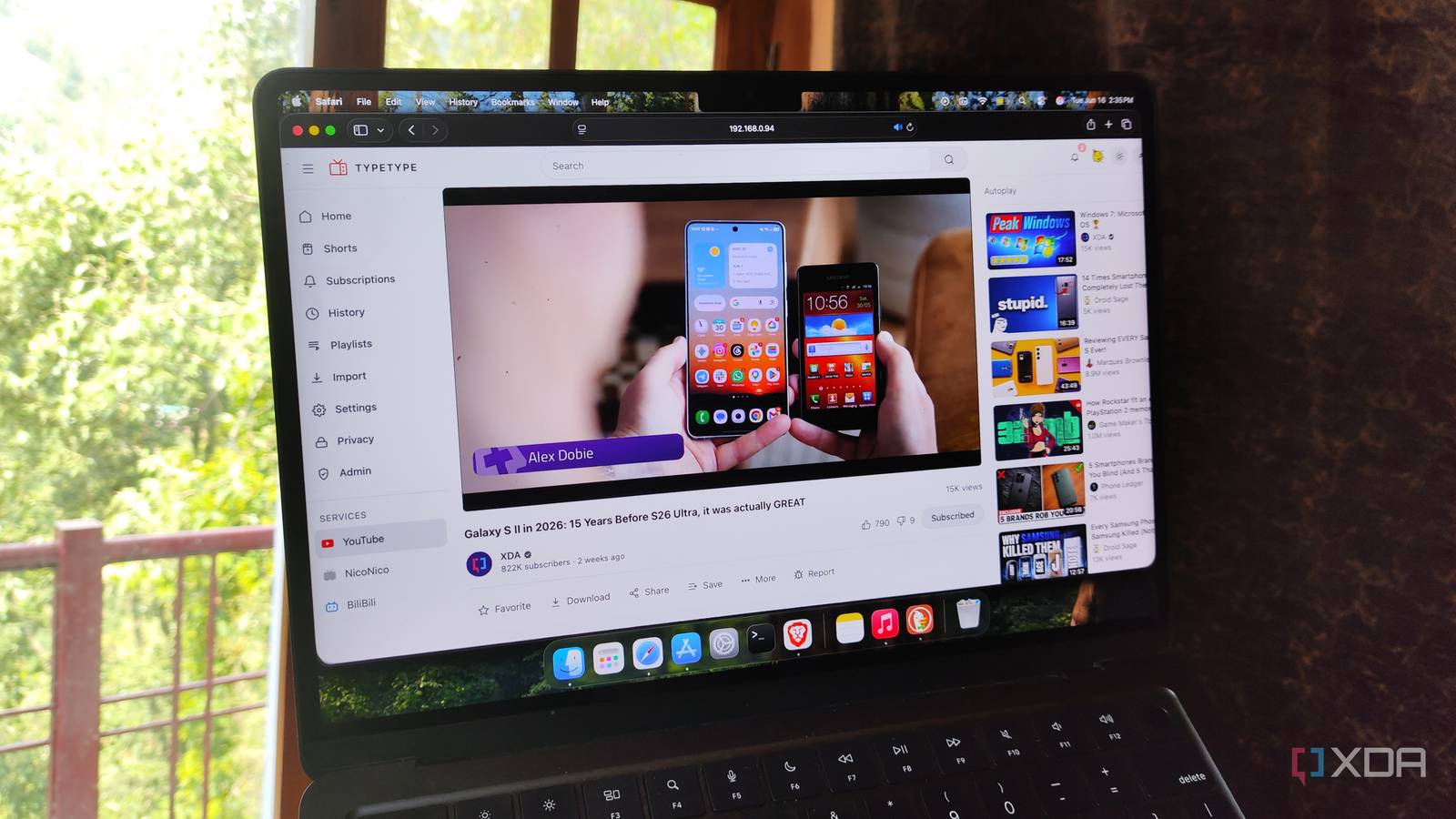
Clunky interfaces and the lack of accessibility features are often my biggest issues with obscure self-hosted tools, but TypeType manages to avoid both of them. UI-wise, it borrows a lot of elements from YouTube’s interface, making it fairly accessible to the less technically adept folks in my household. Although TypeType doesn’t include the ambient mode and sleep timers available in YouTube, it still offers closed captions, loop toggles, and playback speed tweaks. The UI itself is fairly responsive, too, and I haven’t had any issues with the video streaming quality.
Since the app supports custom playlists, channel subscriptions, and watch progress tracking, it’s great for building a curated list of videos from my favorite creators. On the management side, TypeType supports multiple user accounts, with active session monitoring and password recovery provisions available for the admin profile. TypeType can generate share links for videos, and with a little bit of Tailscale magic, I can even use this feature to create watch URLs that are accessible from remote networks.
Since TypeType can import Playlists and channel subscriptions from Google Takeout, I don’t need to build my watch profile from scratch. It also supports video playback for NicoNico and BiliBili, so it’s not just for YouTube-only folks like myself. Toss in the ability to maintain video (and channel) blocklists and download videos directly from its UI, and you can see why I hold TypeType in such high regard.

My favorite alternative to Office 365 isn’t LibreOffice – it’s something way cooler
There’s no need to pay for Office 365 when this free alternative does everything better
Deploying TypeType is just as simple
But you’ll have to tweak the .env file to create accounts on remote machines
Despite serving as a killer tool for my YouTube playback needs, deploying TypeType was a piece of cake. I planned to host it on a virtual machine that’s already armed with Docker Engine, so all I had to do was run the curl -fsSL https://raw.githubusercontent.com/Priveetee/TypeType/main/scripts/install-stack.sh | bash command in my terminal and wait while the script whipped out the entire TypeType application stack. Since the script pulled the default compose.yml and .env configs, I used the IP address of the VM followed by port number 8082 to access TypeType’s web UI… which worked well until I hit a snag when trying to add a new profile.
Although the sign-up window would let me enter fresh user credentials, it’d throw the Registrations are currently closed error. However, the account creation process worked without any issues as long as I signed up from the VM with the localhost:8082 URL. But even with my account ready, I couldn’t log in to TypeType from my remote systems, as the app would claim I’d used incorrect credentials.
Fortunately, one quick search via SearXNG led me to the official announcement post for TypeType on Reddit, where the developer mentioned adding the IP address + port number combo to the ALLOWED_ORIGINS field within the .env file. Sure enough, the account registration wizard worked after I made the tweak and ran the docker compose up -d command within the TypeType config directory.
There are plenty of apps for de-Googling your setup

If getting rid of Google’s privacy-intrusive app collection sounds intriguing, I’ve got a couple of other handy recommendations. SearXNG, as you may have guessed from its utility in the last section, is a self-hosted meta search engine that sends my queries through multiple conventional search engines, while removing the tracking scripts and ads that Google is infamous for.
Meanwhile, Nextcloud Office + Collabora Online (which, contrary to what you might imagine after reading the name, is a self-hosted service) have replaced Google Docs, Sheets, and Slides for my productivity tasks. And this article wouldn’t be complete if I didn’t give a shout-out to Immich, the self-hosted counterpart to Google Photos.